
Introduction
In ASP.NET Core, middleware is the fundamental mechanism that processes every HTTP request and response. Every request that enters the application and every response that leaves it flows through the middleware pipeline.
A middleware component can:
- Inspect the incoming request
- Modify request headers or body
- Decide whether to short-circuit the pipeline
- Invoke the next middleware
- Modify the outgoing response
Because middleware sits at the lowest level of the request lifecycle, it is commonly used for:
- Logging and tracing
- Authentication and authorization
- Rate limiting
- Request validation
- Performance monitoring
- Response transformation
Understanding how to design and implement middleware correctly is critical for building maintainable and high-performance ASP.NET Core applications.
Understanding Middleware Basics
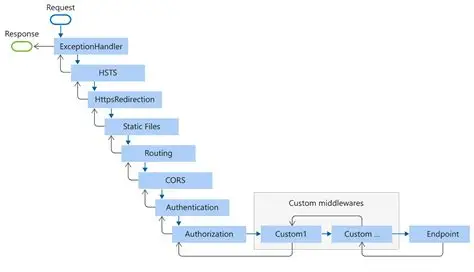
ASP.NET Core uses a chain of responsibility model. Each middleware receives a HttpContext and a delegate pointing to the next component in the pipeline.
Each middleware can execute logic in two phases:
- Before calling
next - After the next middleware completes
This enables powerful cross-cutting behavior.
Conceptual Pipeline Flow
async Task ProcessRequest(HttpContext context)
{
    // Middleware A (before)
    await MiddlewareA(context, async () =>
    {
        // Middleware B (before)
        await MiddlewareB(context, async () =>
        {
            // Endpoint execution
            await Controller(context);
        });
        // Middleware B (after)
    });
    // Middleware A (after)
}
Key observations:
- Middleware order matters
- Short-circuiting stops downstream execution
- Exceptions bubble upward unless handled
How Middleware Is Registered
Middleware is registered during application startup using Use, Map, or Run.
Useallows calling the next middlewareRunterminates the pipelineMapbranches the pipeline based on path
Execution order is the same as registration order.
Implementation Methods
ASP.NET Core provides three main ways to build custom middleware. Each serves a different purpose and has different trade-offs.
1. Request Delegates (Inline Middleware)
This is the simplest way to write middleware. Logic is defined inline using a lambda.
app.Use(async (context, next) =>
{
    var timer = Stopwatch.StartNew();
    var logger = context.RequestServices.GetService<ILogger<Program>>();

    logger?.LogInformation(
        "Processing {Method} {Path}",
        context.Request.Method,
        context.Request.Path
    );

    context.Response.OnStarting(() =>
    {
        context.Response.Headers["X-Response-Time"] =
            timer.ElapsedMilliseconds.ToString();
        return Task.CompletedTask;
    });

    await next(context);

    timer.Stop();

    logger?.LogInformation(
        "Completed {Method} {Path} in {ElapsedMs}ms",
        context.Request.Method,
        context.Request.Path,
        timer.ElapsedMilliseconds
    );
});
This approach is useful for:
- Simple logging
- Header manipulation
- Debugging
- Rapid prototyping
Register OnStarting before calling next: downstream middleware can start writing the response, after which headers become read-only. The header measures elapsed time until headers are sent; the completion log measures the full downstream duration.
Limitations
- Hard to test
- No clear separation of concerns
- Grows messy as logic increases
- Limited reuse
Inline middleware should remain small and focused.
2. Convention-Based Middleware (Class + Extension Method)
This is the most commonly recommended approach for production code.
It consists of:
- A middleware class
- A constructor receiving
RequestDelegateand dependencies - An
InvokeAsyncmethod - An extension method for registration
public class RequestLoggingMiddleware
{
    private readonly RequestDelegate _next;
    private readonly ILogger<RequestLoggingMiddleware> _logger;
    private readonly RequestLoggingOptions _options;

    public RequestLoggingMiddleware(
        RequestDelegate next,
        ILogger<RequestLoggingMiddleware> logger,
        IOptions<RequestLoggingOptions> options)
    {
        _next = next;
        _logger = logger;
        _options = options.Value;
    }

    public async Task InvokeAsync(HttpContext context)
    {
        var request = await FormatRequest(context.Request);
        _logger.LogInformation("Incoming Request: {Request}", request);

        await _next(context);

        var response = await FormatResponse(context.Response);
        _logger.LogInformation("Outgoing Response: {Response}", response);
    }
}
Extension Method
public static class RequestLoggingMiddlewareExtensions
{
    public static IApplicationBuilder UseRequestLogging(
        this IApplicationBuilder builder)
    {
        return builder.UseMiddleware<RequestLoggingMiddleware>();
    }
}
Usage
app.UseRequestLogging();Why This Works Well
- Clear responsibility boundaries
- Full dependency injection support
- Configurable via options
- Easy to unit test
- Reusable across applications
This is the preferred approach for most custom middleware.
3. Factory-Based Middleware (IMiddleware)
This approach uses the IMiddleware interface. Each request receives a fresh instance.
public class PerformanceMiddleware : IMiddleware
{
    private readonly ILogger<PerformanceMiddleware> _logger;
    private readonly IMetricsService _metrics;

    public PerformanceMiddleware(
        ILogger<PerformanceMiddleware> logger,
        IMetricsService metrics)
    {
        _logger = logger;
        _metrics = metrics;
    }

    public async Task InvokeAsync(HttpContext context, RequestDelegate next)
    {
        var timer = Stopwatch.StartNew();
        var path = context.Request.Path;

        try
        {
            await next(context);
        }
        finally
        {
            timer.Stop();

            await _metrics.RecordMetricAsync(new RequestMetric
            {
                Path = path,
                Method = context.Request.Method,
                Duration = timer.ElapsedMilliseconds,
                StatusCode = context.Response.StatusCode
            });
        }
    }
}
Registration
services.AddTransient<PerformanceMiddleware>();
app.UseMiddleware<PerformanceMiddleware>();
Characteristics
- Full constructor injection
- New instance per request
- Easier unit testing
- Slightly higher allocation cost
This approach is ideal for complex middleware with many dependencies or when strict test isolation is required.
Middleware Lifetime and DI Behavior
- Convention-based middleware is created once
- Dependencies follow their registered lifetimes
IMiddlewareinstances are created per request
Avoid injecting scoped services into singleton middleware unless the middleware itself is scoped via IMiddleware.
Best Practices
Error Handling
Centralized exception handling middleware is common.
public async Task InvokeAsync(HttpContext context, RequestDelegate next)
{
    try
    {
        await next(context);
    }
    catch (Exception ex)
    {
        _logger.LogError(ex, "Unhandled exception");
        context.Response.StatusCode = 500;
        await context.Response.WriteAsync("Internal Server Error");
    }
}
This should be placed early in the pipeline.
Performance Considerations
- Avoid buffering request bodies unless necessary
- Use async APIs exclusively
- Minimize allocations
- Avoid synchronous I/O
- Be careful with large response interception
Middleware runs on every request. Even small inefficiencies multiply quickly.
Configuration Support
Middleware should be configurable via options.
public class MiddlewareOptions
{
    public bool EnableLogging { get; set; }
    public string[] ExcludedPaths { get; set; }
    public int TimeoutSeconds { get; set; }
}services.Configure<MiddlewareOptions>(
configuration.GetSection("Middleware"));Avoid hardcoded behavior.
Advanced Scenarios
Conditional Execution
public async Task InvokeAsync(HttpContext context, RequestDelegate next)
{
    if (!_options.ExcludedPaths.Contains(context.Request.Path))
    {
        await ProcessRequest(context);
    }

    await next(context);
}
This is useful for excluding health checks or static files.
Branching Pipelines
app.Map("/api", apiApp =>
{
    apiApp.UseMiddleware<ApiVersionMiddleware>();
    apiApp.UseMiddleware<ApiKeyMiddleware>();
});
Branching avoids unnecessary middleware execution for unrelated routes.
Ordering Pitfalls
Incorrect ordering can break applications.
Examples:
- Authentication must run before authorization
- Exception handling must wrap downstream components
- Response compression must run before response writing
Pipeline order should be intentional and documented.
Middleware Approach Comparison
| Approach | Complexity | DI Support | Best Use Case |
|---|---|---|---|
| Request Delegates | Low | Limited | Small logic, quick checks |
| Convention-Based | Medium | Good | Reusable, configurable middleware |
| Factory-Based | High | Excellent | Complex logic, enterprise systems |
Summary
Middleware is the backbone of ASP.NET Core request processing.
Key takeaways:
- Middleware order defines behavior
- Keep middleware focused and small
- Prefer convention-based middleware by default
- Use
IMiddlewarefor complex, test-heavy scenarios - Treat middleware as infrastructure, not business logic
Well-designed middleware leads to cleaner controllers, consistent cross-cutting behavior, and scalable applications.
Verified Examples
Checked on September 16, 2026 with ASP.NET Core 10.0.12 and .NET 10.0.12, using SDK 10.0.112. A local Kestrel server handled two real HTTP requests to verify delegate ordering, one-time construction of conventional middleware, per-request resolution of transient IMiddleware, and a response timing header registered through OnStarting.
The verification harness is scripts/verify-blog/dotnet/Program.cs in the portfolio repository. The logging and metrics helpers in the article remain application-specific examples.