
Introduction
Nginx is one of the most widely used web servers and reverse proxies in production systems. It powers high-traffic websites, APIs, microservices platforms, and edge gateways worldwide. Companies like Netflix, Dropbox, and WordPress.com rely on Nginx to handle millions of concurrent connections.
Unlike traditional process-based servers (Apache with prefork MPM), Nginx is built around an event-driven, non-blocking architecture. This fundamental design difference allows it to handle tens of thousands of concurrent connections with predictable resource usage and minimal memory footprint.
Nginx is commonly deployed for:
- Serving static content - HTML, CSS, JavaScript, images with sendfile() optimization
- Reverse proxy - Abstracting backend services behind a unified interface
- Load balancing - Distributing traffic across multiple backend servers
- TLS termination - Offloading SSL/TLS encryption from application servers
- API gateways - Request routing, authentication, rate limiting
- Zero-downtime deployments - Graceful configuration reloads without dropping connections
- Security filtering - DDoS protection, request validation, WAF integration
To use Nginx effectively in production, you must understand how requests flow through its processing pipeline, how configuration directives are evaluated, and how architectural decisions affect performance characteristics.
Nginx Architecture: The Master-Worker Model
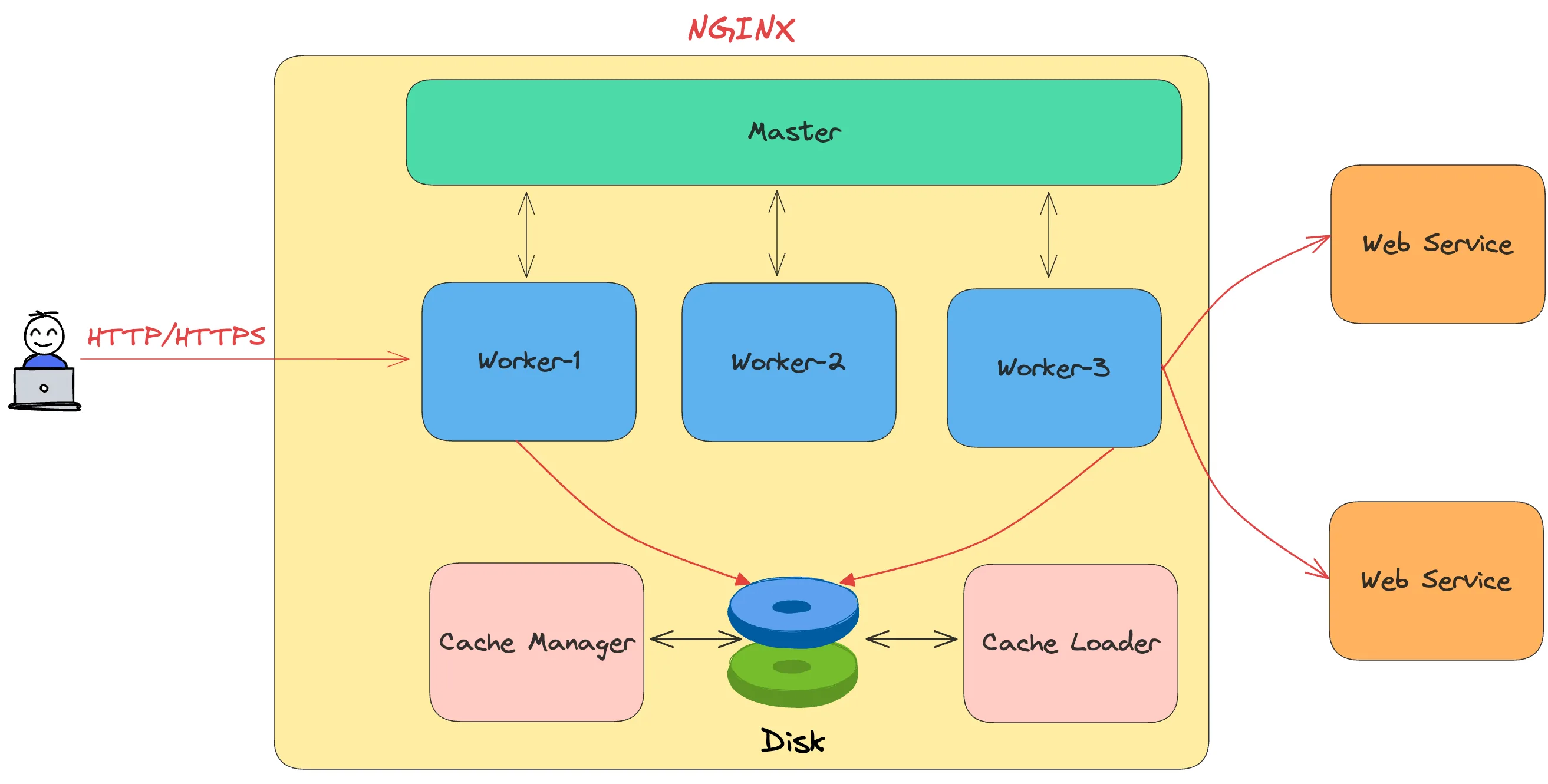
Nginx uses a master-worker process model that differs fundamentally from traditional web servers like Apache's prefork MPM.
Master Process Responsibilities
The master process runs as root (or with CAP_NET_BIND_SERVICE on Linux) and performs privileged operations:
- Configuration management - Reads, parses, and validates nginx.conf
- Port binding - Binds to privileged ports (80, 443) before dropping privileges
- Worker lifecycle - Spawns, monitors, and restarts worker processes
- Signal handling - Processes SIGHUP (reload), SIGTERM (shutdown), SIGUSR1 (log rotation)
- Graceful operations - Coordinates zero-downtime configuration reloads
- Binary upgrades - Enables hot-swapping Nginx binary without downtime
The master process does not handle client connections. It's purely a supervisor.
Worker Process Design
Worker processes run as unprivileged users (typically nginx or www-data) and handle all client traffic:
worker_processes auto;  # One per CPU core
worker_cpu_affinity auto;  # Pin workers to specific CPUs
Each worker operates independently with:
- Event loop - Uses epoll (Linux), kqueue (FreeBSD), or event ports (Solaris)
- Non-blocking I/O - All socket operations are async
- Connection pooling - Reuses connections to upstream servers
- Memory management - Per-worker memory pools for efficient allocation
Why This Architecture Matters
Traditional process-per-connection models (Apache prefork) consume resources linearly:
- 10,000 connections = 10,000 processes = GBs of memory
- Context switching overhead increases with connection count
- Resource limits become bottlenecks (file descriptors, memory)
Nginx's event-driven model scales differently:
- 10,000 connections = 4-8 worker processes = hundreds of MBs
- No context switching between connections
- Predictable memory usage regardless of connection count
Result: A single Nginx instance can handle 100,000+ concurrent connections on modest hardware.
Event-Driven Architecture Deep Dive
Nginx workers use an event loop similar to Node.js, but implemented in C for maximum performance.
The Event Loop
Each worker runs a continuous loop:
while (true) {
    // Wait for events (readable sockets, timers, signals)
    events = epoll_wait(epfd, max_events, timeout);

    // Process each event without blocking
    for (event in events) {
        if (event.type == READ) {
            read_request_nonblocking(event.socket);
        } else if (event.type == WRITE) {
            write_response_nonblocking(event.socket);
        } else if (event.type == TIMER) {
            handle_timeout(event.connection);
        }
    }

    // Process deferred handlers
    process_posted_events();
}
Non-Blocking I/O Implementation
All socket operations use O_NONBLOCK flag:
accept()returns immediately with EAGAIN if no connections pendingread()returns partial data or EAGAIN without blockingwrite()returns bytes written or EAGAIN if socket buffer full
If an operation can't complete immediately:
- Register interest with epoll/kqueue
- Return to event loop
- Resume when socket becomes ready
This allows a single worker to juggle thousands of connections without threads.
Request Processing Pipeline
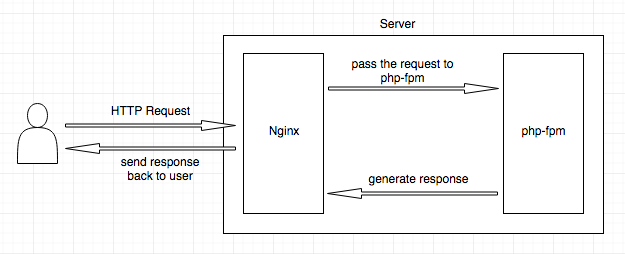
Understanding Nginx's request processing phases is crucial for correct configuration.
Processing Phases (in order)
- POST_READ - Request headers just read
- SERVER_REWRITE - Server-level rewrites (before location matching)
- FIND_CONFIG - Location block selection
- REWRITE - Location-level rewrites
- POST_REWRITE - Check if URI changed (may restart from FIND_CONFIG)
- PREACCESS - Modules that run before access check (limit_req, limit_conn)
- ACCESS - Access control (allow, deny, auth_basic)
- POST_ACCESS - Check access results
- PRECONTENT - try_files directive runs here
- CONTENT - Generate response (proxy_pass, fastcgi_pass, return, etc.)
- LOG - Write access logs
Phase Execution Rules
- Phases run sequentially, but some can be skipped
- Multiple handlers can register for a phase
- A handler can short-circuit the pipeline (e.g.,
return 403) - Location rewrites can restart the pipeline from FIND_CONFIG
Example Request Flow
server {
    listen 80;
    server_name api.example.com;

    # SERVER_REWRITE phase
    rewrite ^/v1/(.*)$ /api/v1/$1 last;

    location /api/ {
        # REWRITE phase
        rewrite ^/api/v1/users$ /api/v1/users/ permanent;

        # PREACCESS phase
        limit_req zone=api burst=20;

        # ACCESS phase
        allow 10.0.0.0/8;
        deny all;

        # CONTENT phase
        proxy_pass http://backend;
    }
}
Execution for /v1/users:
- SERVER_REWRITE: URI becomes
/api/v1/users - FIND_CONFIG: Matches
/api/location - REWRITE: URI becomes
/api/v1/users/(301 redirect sent) - Pipeline stops, response returned
Configuration File Structure and Inheritance
Nginx configuration uses a hierarchical, context-based structure with specific inheritance rules.
Context Hierarchy
main          # Global directives
├── events    # Connection processing settings
└── http      # HTTP server settings
    ├── upstream    # Backend server groups
    ├── server      # Virtual host
    │   └── location    # URI-specific rules
    │       └── if      # Conditional logic (use sparingly)
    └── map     # Variable mappings
Directive Context Rules
Each directive is only valid in specific contexts:
worker_processes- main onlylisten- server onlyproxy_pass- location, if in locationroot- http, server, location, if in location
Wrong context = configuration error.
Inheritance Behavior
Child contexts inherit from parents but can override:
http {
    client_max_body_size 10m;  # Default for all servers

    server {
        # Inherits 10m

        location /upload {
            client_max_body_size 100m;  # Override for this location
        }
    }
}Important: Some directives merge (add_header), others replace (root, proxy_pass).
Location Matching: The Most Critical Concept
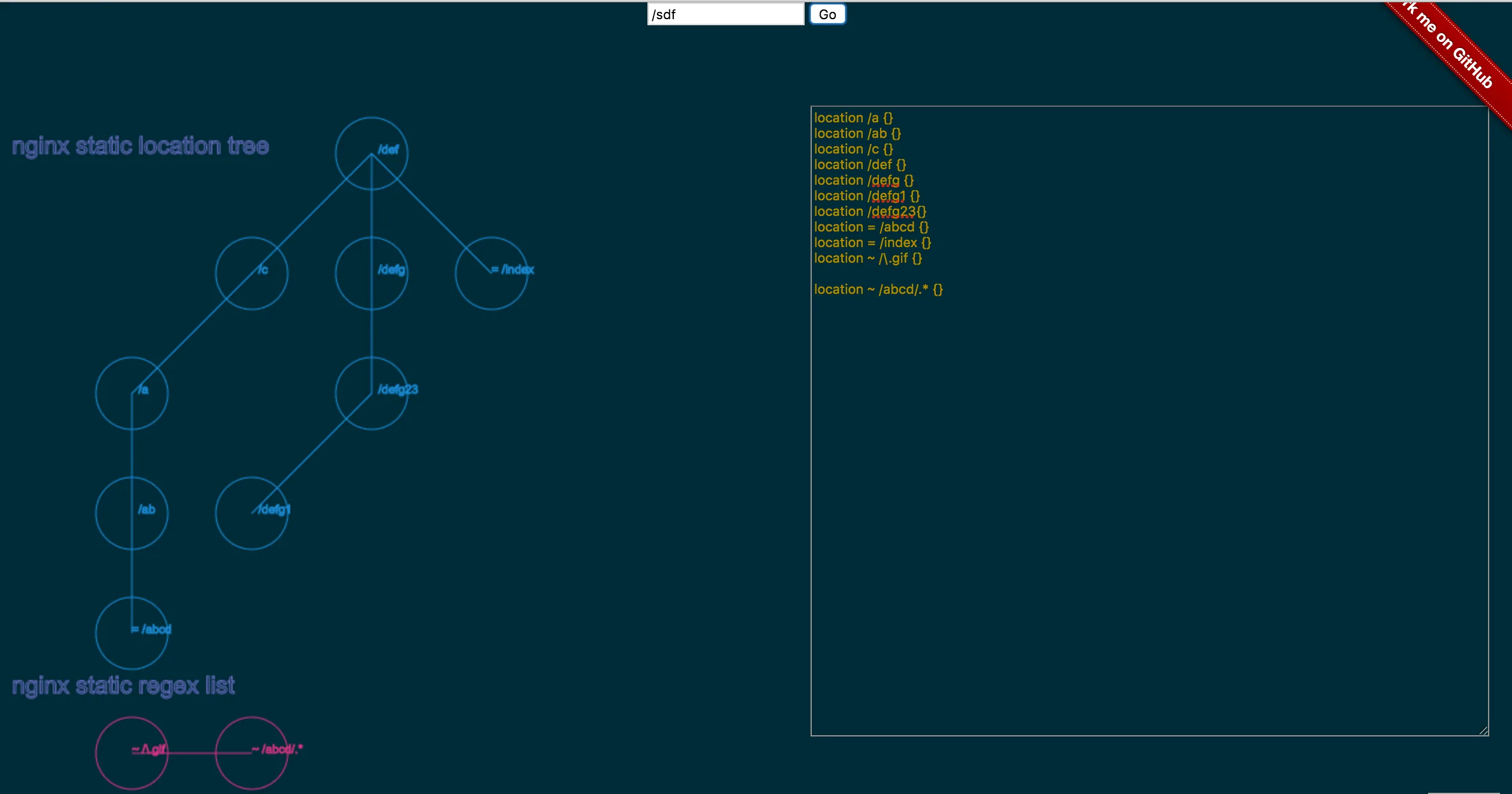
Location matching determines which block handles a request. Getting this wrong causes 90% of Nginx misconfigurations.
Match Types (in priority order)
- Exact match
= /path - Preferential prefix
^~ /path - Regex (case-sensitive)
~ pattern - Regex (case-insensitive)
~* pattern - Longest prefix
/path
Matching Algorithm
1. Check for exact match (=)
   └─> If found, stop immediately

2. Store longest prefix match
   └─> If it's preferential (^~), stop

3. Test regexes in order of appearance
   └─> If match found, use it and stop

4. If no regex matched, use stored prefix
Common Pitfalls
Mistake #1: Regex overrides longer prefix
location /api/ { proxy_pass http://api; }      # Prefix
location ~ \.php$ { fastcgi_pass php; }        # Regex
Request /api/test.php hits the PHP location, not /api/!
Fix: Use preferential prefix
location ^~ /api/ { proxy_pass http://api; }   # Stops before regex
location ~ \.php$ { fastcgi_pass php; }
Mistake #2: Forgetting trailing slashes
location /api { proxy_pass http://backend; }Matches /api, /api123, /apitest - probably not what you want.
Fix: Be specific
location = /api { }          # Exact /api only
location /api/ { }           # /api/anything
location ~ ^/api(/|$) { }    # /api or /api/anything
Location Matching Visual Guide
Real-World Examples
server {
    # Health check - fastest possible response
    location = /health {
        access_log off;
        return 200 "OK\n";
    }

    # API routes - must not hit static file handlers
    location ^~ /api/ {
        proxy_pass http://backend;
        proxy_http_version 1.1;
        proxy_set_header Connection "";
    }

    # Static assets with caching
    location ~* \.(jpg|jpeg|png|gif|ico|css|js)$ {
        expires 30d;
        add_header Cache-Control "public, immutable";
    }

    # PHP files
    location ~ \.php$ {
        fastcgi_pass unix:/run/php-fpm.sock;
        fastcgi_param SCRIPT_FILENAME $document_root$fastcgi_script_name;
        include fastcgi_params;
    }

    # Default fallback
    location / {
        try_files $uri $uri/ =404;
    }
}
Request routing:
/health→ Exact match, returns 200 immediately/api/users→ Preferential prefix, proxies to backend/logo.png→ Regex match, serves with cache headers/index.php→ Regex match, passes to PHP-FPM/about→ Prefix match, tries file then 404
Reverse Proxy Configuration
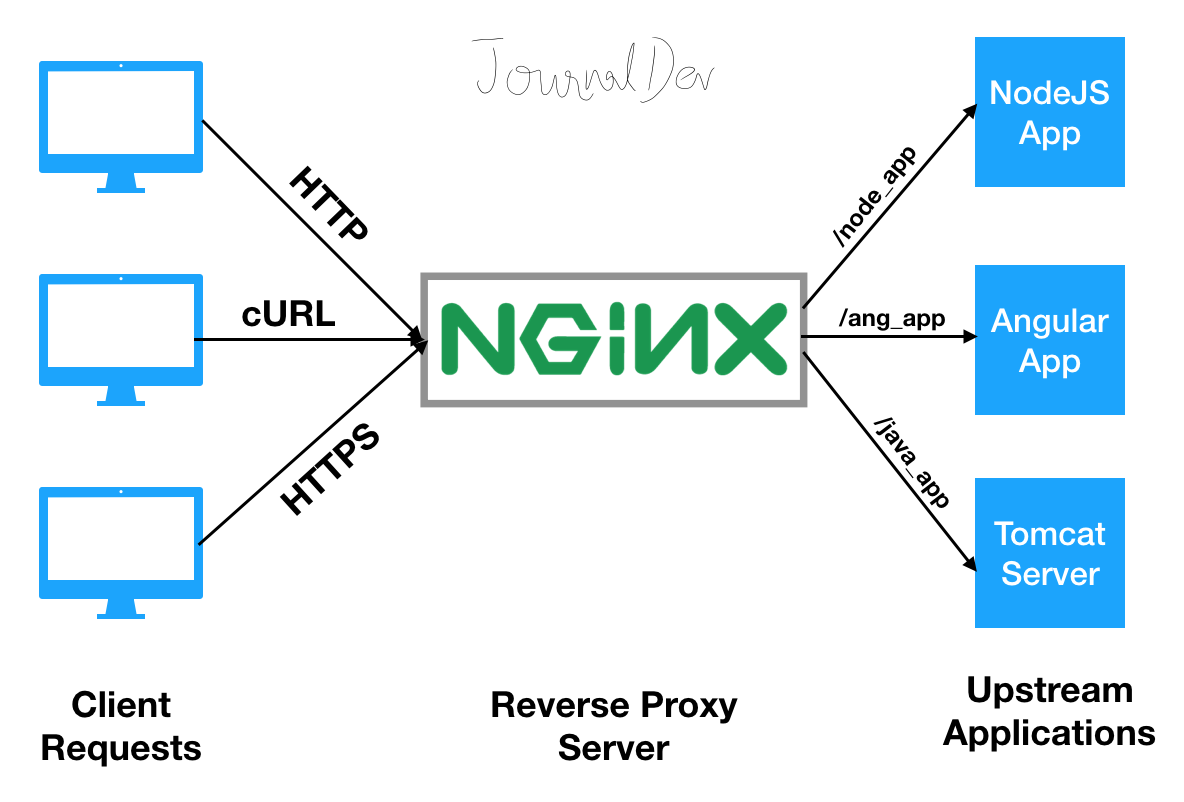
Nginx excels as a reverse proxy, sitting between clients and application servers.
Basic Proxy Configuration
location / {
    proxy_pass http://backend;
}
This works, but is suboptimal for production.
Production-Grade Proxy Config
location / {
    # Backend address
    proxy_pass http://backend;

    # HTTP version (1.1 required for keepalive)
    proxy_http_version 1.1;

    # Essential headers
    proxy_set_header Host $host;
    proxy_set_header X-Real-IP $remote_addr;
    proxy_set_header X-Forwarded-For $proxy_add_x_forwarded_for;
    proxy_set_header X-Forwarded-Proto $scheme;

    # WebSocket support
    proxy_set_header Upgrade $http_upgrade;
    proxy_set_header Connection $connection_upgrade;

    # Timeouts
    proxy_connect_timeout 60s;
    proxy_send_timeout 60s;
    proxy_read_timeout 60s;

    # Buffering
    proxy_buffering on;
    proxy_buffer_size 4k;
    proxy_buffers 8 4k;

    # Connection reuse
    proxy_http_version 1.1;
    proxy_set_header Connection "";
}
Why Each Header Matters
Host header: Backend needs to know which virtual host was requested
proxy_set_header Host $host; # Preserve original Host headerWithout this, backend sees Nginx's internal hostname, breaking virtual hosting.
X-Real-IP: Backend can't see client IP otherwise
proxy_set_header X-Real-IP $remote_addr;Backend sees Nginx's IP without this, breaking IP-based access control and logging.
X-Forwarded-For: Preserves proxy chain
proxy_set_header X-Forwarded-For $proxy_add_x_forwarded_for;Appends client IP to existing header, maintaining full proxy chain.
X-Forwarded-Proto: Backend needs to know if request was HTTPS
proxy_set_header X-Forwarded-Proto $scheme;Critical for backends that generate absolute URLs or enforce HTTPS.
Load Balancing Strategies
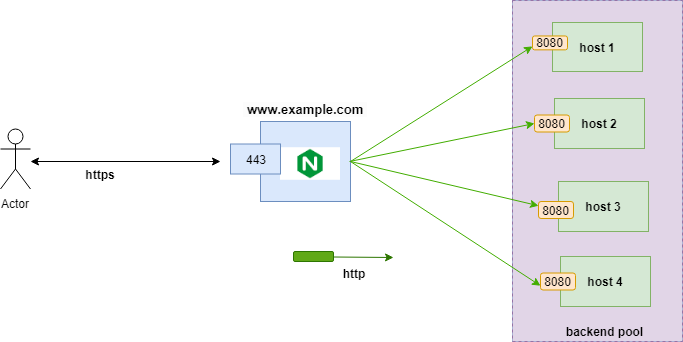
Nginx provides several load balancing algorithms, each suited for different scenarios.
Upstream Block Configuration
upstream backend {
    # Load balancing method (see below)
    least_conn;

    # Backend servers
    server app1:8080 weight=3 max_fails=3 fail_timeout=30s;
    server app2:8080 weight=2 max_fails=3 fail_timeout=30s;
    server app3:8080 weight=1 max_fails=3 fail_timeout=30s;
    server app4:8080 backup;  # Only used if all others down

    # Connection pooling
    keepalive 32;
    keepalive_requests 100;
    keepalive_timeout 60s;
}

location / {
    proxy_pass http://backend;
    proxy_http_version 1.1;
    proxy_set_header Connection "";
}
Load Balancing Algorithms
1. Round Robin (default)
upstream backend {
    server app1:8080;
    server app2:8080;
    server app3:8080;
}- Distributes requests evenly across servers
- Simple, predictable, works well for homogeneous backends
- Use when: All backends have equal capacity
2. Least Connections
upstream backend {
    least_conn;
    server app1:8080;
    server app2:8080;
    server app3:8080;
}- Routes to server with fewest active connections
- Better for long-lived connections or mixed workloads
- Use when: Request processing time varies significantly
3. IP Hash
upstream backend {
    ip_hash;
    server app1:8080;
    server app2:8080;
    server app3:8080;
}- Same client IP always goes to same backend
- Provides session affinity without shared storage
- Use when: Application requires sticky sessions but can't use shared session store
- Limitation: Breaks if client IP changes (mobile networks)
4. Generic Hash
upstream backend {
    hash $request_uri consistent;  # Or $cookie_sessionid, etc.
    server app1:8080;
    server app2:8080;
    server app3:8080;
}- Hash any variable for custom affinity
consistentparameter uses consistent hashing (minimizes redistribution when servers change)- Use when: You need affinity based on specific request attributes
5. Least Time (Nginx Plus only)
upstream backend {
    least_time header;  # Or 'last_byte'
    server app1:8080;
    server app2:8080;
    server app3:8080;
}- Routes to server with lowest average response time
- Most intelligent algorithm, adapts to backend performance
- Use when: You have Nginx Plus and mixed backend performance
Health Checks and Failure Handling
upstream backend {
    server app1:8080 max_fails=3 fail_timeout=30s;
    server app2:8080 max_fails=3 fail_timeout=30s;
}
Passive health checks:
- After
max_failsconsecutive failures, mark server as down - Retry after
fail_timeoutseconds - Failure criteria: Connection refused, timeout, or 502/503/504 response
Active health checks (Nginx Plus):
upstream backend {
    zone backend 64k;
    server app1:8080;
    server app2:8080;
}

location / {
    proxy_pass http://backend;
    health_check interval=5s fails=3 passes=2 uri=/health;
}
Periodically sends health check requests regardless of client traffic.
Connection Pooling
upstream backend {
    server app1:8080;
    server app2:8080;

    keepalive 32;  # Pool size
    keepalive_requests 100;  # Requests per connection
    keepalive_timeout 60s;  # Idle timeout
}

location / {
    proxy_pass http://backend;
    proxy_http_version 1.1;  # Required
    proxy_set_header Connection "";  # Clear Connection header
}Impact: Reduces TCP handshake overhead, especially over high-latency networks.
Advanced Reverse Proxy Patterns
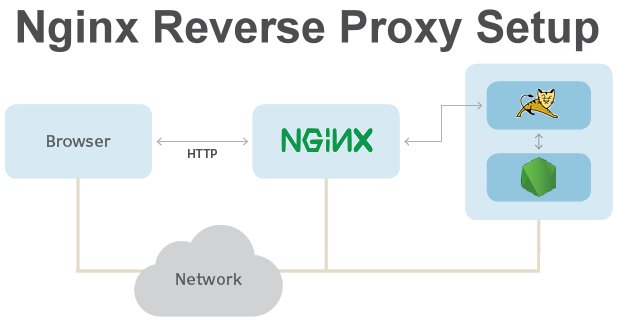
Request/Response Buffering
By default, Nginx buffers backend responses before sending to client:
proxy_buffering on;  # Default
proxy_buffer_size 4k;  # Buffer for response headers
proxy_buffers 8 4k;  # Buffers for response body
proxy_busy_buffers_size 8k; # Can send to client while receivingAdvantages:
- Frees backend quickly (backend doesn't wait for slow clients)
- Smoother traffic with slow clients
- Can retry on backend failure
Disadvantages:
- Adds latency for first byte
- Uses more memory
- Breaks Server-Sent Events, WebSockets, streaming
When to Disable Buffering
location /stream {
    proxy_buffering off;  # Disable for streaming
    proxy_pass http://backend;
}
Use proxy_buffering off for:
- Server-Sent Events (SSE)
- WebSockets (after upgrade)
- Streaming APIs
- Large file downloads where you want backpressure
Request Buffering
client_body_buffer_size 128k;  # Buffer requests in memory
client_max_body_size 100m;  # Max request body size
client_body_temp_path /tmp/nginx/client_body;  # Disk spill location
Large uploads: Requests > buffer size spill to disk. Set client_body_buffer_size based on typical request sizes.
TLS/SSL Configuration
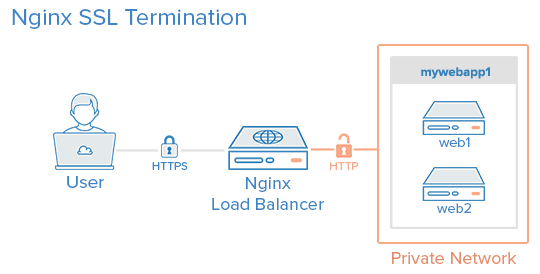
Nginx commonly terminates TLS, offloading encryption from application servers.
Modern TLS Configuration
server {
    listen 443 ssl http2;
    server_name example.com;

    # Certificate and key
    ssl_certificate /etc/ssl/certs/fullchain.pem;
    ssl_certificate_key /etc/ssl/private/privkey.pem;

    # Protocols
    ssl_protocols TLSv1.2 TLSv1.3;
    ssl_prefer_server_ciphers on;

    # Ciphers
    ssl_ciphers 'ECDHE-ECDSA-AES128-GCM-SHA256:ECDHE-RSA-AES128-GCM-SHA256:ECDHE-ECDSA-AES256-GCM-SHA384:ECDHE-RSA-AES256-GCM-SHA384';

    # Session cache
    ssl_session_cache shared:SSL:10m;
    ssl_session_timeout 10m;
    ssl_session_tickets off;

    # OCSP stapling
    ssl_stapling on;
    ssl_stapling_verify on;
    ssl_trusted_certificate /etc/ssl/certs/chain.pem;

    # Security headers
    add_header Strict-Transport-Security "max-age=31536000; includeSubDomains" always;
}
SSL Session Caching
ssl_session_cache shared:SSL:10m;Caches SSL session parameters across workers:
- Eliminates full handshake for returning clients
- Reduces CPU usage by ~90% for repeat connections
- 1MB cache stores ~4000 sessions
OCSP Stapling
ssl_stapling on;
ssl_stapling_verify on;
Nginx fetches OCSP responses and includes them in TLS handshake:
- Clients don't need to contact CA
- Faster connections, better privacy
- Reduces CA load
HTTP/2 Optimization
Enable HTTP/2 for better performance:
listen 443 ssl http2;Benefits:
- Multiplexing: Multiple requests over one TCP connection
- Header compression: Reduces bandwidth
- Server push: Proactively send resources (use sparingly)
Note: HTTP/2 only works over TLS in practice (browsers require it).
Caching Configuration
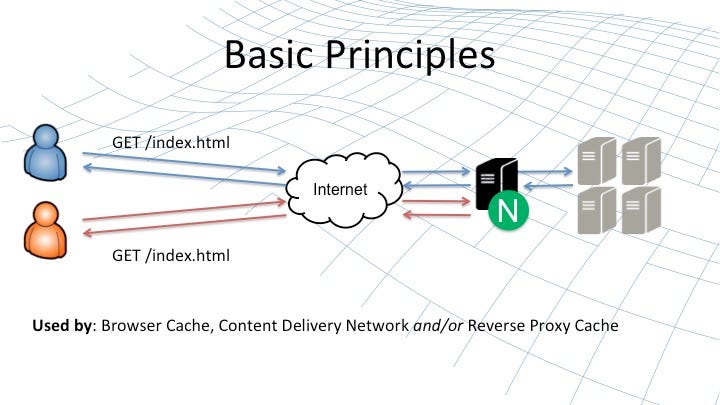
Nginx can cache proxy responses, dramatically reducing backend load.
Caching Setup
# Define cache zone
proxy_cache_path /var/cache/nginx/proxy
                 levels=1:2
                 keys_zone=my_cache:10m
                 max_size=1g
                 inactive=60m
                 use_temp_path=off;

server {
    location / {
        proxy_cache my_cache;
        proxy_cache_valid 200 10m;
        proxy_cache_valid 404 1m;
        proxy_cache_use_stale error timeout updating;
        proxy_cache_background_update on;
        proxy_cache_lock on;

        # Cache key
        proxy_cache_key "$scheme$request_method$host$request_uri";

        # Add cache status header
        add_header X-Cache-Status $upstream_cache_status;

        proxy_pass http://backend;
    }
}
Cache Parameters Explained
levels=1:2: Directory structure depth (prevents too many files in one directory)
keys_zone: Shared memory zone for cache metadata (1MB ≈ 8000 keys)
max_size: Maximum cache size on disk
inactive: Remove cached items not accessed in this period
use_temp_path=off: Write directly to cache directory (faster)
Cache Behavior Control
proxy_cache_use_stale error timeout updating http_500 http_502 http_503;Serve stale cache when:
- Backend is down
- Backend times out
- Backend is being updated
- Backend returns 500/502/503
This provides better availability than failing.
Cache Bypass
proxy_cache_bypass $http_pragma $http_authorization;
proxy_no_cache $http_pragma $http_authorization;
Don't cache requests with Pragma or Authorization headers.
Cache Performance
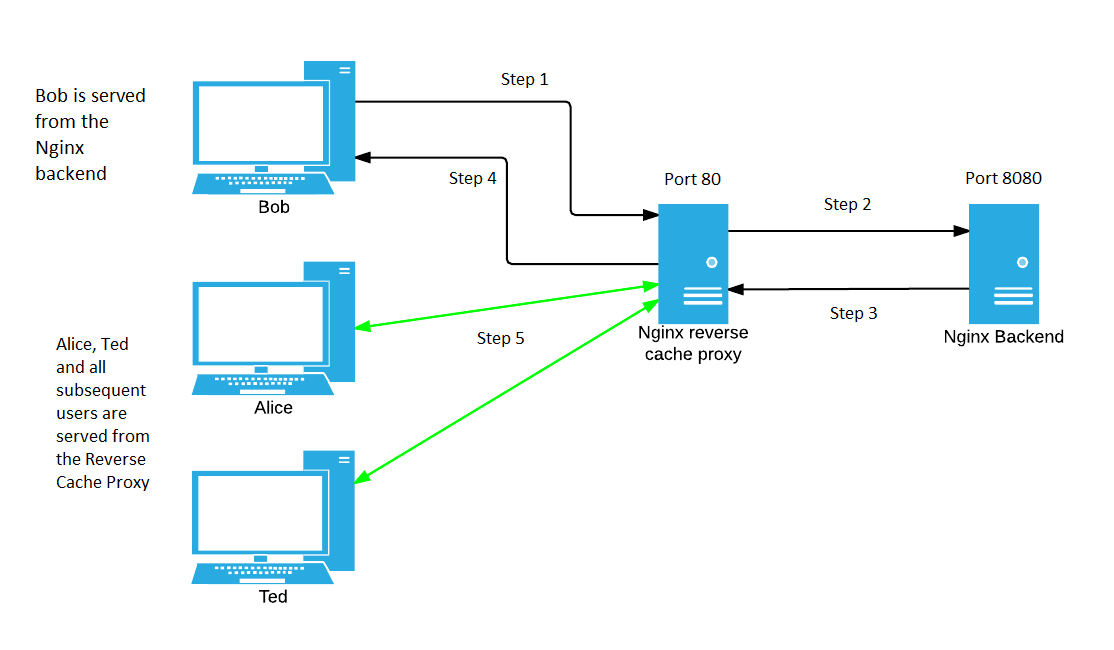
With caching:
- Cache hit: ~0.1ms response time, 0% backend load
- Cache miss: Normal backend latency
- Cache hit ratio determines overall performance gain
Monitor with:
add_header X-Cache-Status $upstream_cache_status;Values: HIT, MISS, EXPIRED, STALE, UPDATING, REVALIDATED, BYPASS
Rate Limiting
Nginx provides sophisticated rate limiting to protect backends and enforce quotas.
Basic Rate Limiting
# Define rate limit zone
limit_req_zone $binary_remote_addr zone=api:10m rate=10r/s;

location /api/ {
    limit_req zone=api burst=20 nodelay;
    proxy_pass http://backend;
}Parameters:
$binary_remote_addr: Key for limiting (client IP)zone=api:10m: 10MB shared memory zone (stores ~160k IP addresses)rate=10r/s: Allow 10 requests per secondburst=20: Allow bursts up to 20 requests above ratenodelay: Process burst immediately (don't delay to smooth rate)
Rate Limiting Behavior
Without burst:
- Request 1-10 in first second: OK
- Request 11: 503 (rate exceeded)
With burst=20 nodelay:
- Request 1-30 in first second: All OK (10 + 20 burst)
- Request 31: 503
- After 1 second: 10 more requests allowed (rate refills)
With burst=20 (no nodelay):
- Request 1-10: Served immediately
- Request 11-30: Queued, served at rate (100ms apart)
- Request 31: 503
Multiple Rate Limits
limit_req_zone $binary_remote_addr zone=global:10m rate=100r/s;
limit_req_zone $binary_remote_addr zone=api:10m rate=10r/s;
limit_req_zone $server_name zone=per_vhost:10m rate=1000r/s;

location /api/ {
    limit_req zone=global burst=50;
    limit_req zone=api burst=20;
    proxy_pass http://backend;
}
All limits must pass for request to proceed.
Connection Limiting
limit_conn_zone $binary_remote_addr zone=addr:10m;

location /download/ {
    limit_conn addr 2;  # Max 2 concurrent connections per IP
    proxy_pass http://storage;
}
Use for:
- Limiting concurrent downloads
- Preventing resource exhaustion
- Enforcing connection quotas
Security Best Practices
Hide Server Information
server_tokens off;  # Don't expose Nginx version
more_clear_headers Server;  # Remove Server header entirely (requires headers-more module)
Deny Access to Hidden Files
location ~ /\. {
    deny all;
    access_log off;
    log_not_found off;
}
Blocks .git, .env, .htaccess, etc.
Block Common Vulnerability Scanners
location ~* (wp-admin|wp-login|xmlrpc\.php|phpmyadmin) {
    return 444;  # Close connection without response
}
Request Size Limits
client_max_body_size 10m;  # Max request body
client_body_timeout 12s;
client_header_timeout 12s;
Prevents slowloris and similar attacks.
Security Headers
add_header X-Frame-Options "SAMEORIGIN" always;
add_header X-Content-Type-Options "nosniff" always;
add_header X-XSS-Protection "1; mode=block" always;
add_header Referrer-Policy "no-referrer-when-downgrade" always;
add_header Content-Security-Policy "default-src 'self' https:" always;
Zero-Downtime Operations
Configuration Reload
nginx -t  # Test configuration
nginx -s reload  # Graceful reload
What happens:
- Master reads new config
- Master spawns new workers
- Master signals old workers to stop accepting new connections
- Old workers finish existing requests
- Old workers exit after all requests complete
- No connections dropped
Binary Upgrade
kill -USR2 `cat /var/run/nginx.pid`  # Start new master with new binary
kill -WINCH `cat /var/run/nginx.pid.oldbin`  # Old workers stop accepting connections
kill -QUIT `cat /var/run/nginx.pid.oldbin`  # Gracefully shutdown old master
Upgrades Nginx binary without downtime.
Observability and Debugging
Structured Logging
log_format detailed '$remote_addr - $remote_user [$time_local] '
                    '"$request" $status $body_bytes_sent '
                    '"$http_referer" "$http_user_agent" '
                    'rt=$request_time uct="$upstream_connect_time" '
                    'uht="$upstream_header_time" urt="$upstream_response_time"';

access_log /var/log/nginx/access.log detailed buffer=32k flush=5s;
error_log /var/log/nginx/error.log warn;
Key metrics:
$request_time: Total request time (client → Nginx → backend → client)$upstream_connect_time: Time to connect to backend$upstream_header_time: Time to receive first byte from backend$upstream_response_time: Time to receive full response from backend
Debug Logging
error_log /var/log/nginx/error.log debug;Extremely verbose, use only for troubleshooting specific issues.
Stub Status Module
location /nginx_status {
    stub_status;
    allow 127.0.0.1;
    deny all;
}curl http://localhost/nginx_statusOutput:
Active connections: 291
server accepts handled requests
 16630 16630 31070
Reading: 6 Writing: 179 Waiting: 106
Common Production Mistakes
1. Too many regex locations - Regex matching is sequential, slow for many patterns
2. Missing timeouts - Slow backends can exhaust connections
proxy_connect_timeout 60s;
proxy_send_timeout 60s;
proxy_read_timeout 60s;
3. Over-buffering - Wastes memory, increases latency
4. Ignoring worker_connections - Limits concurrent connections
events {
    worker_connections 4096;  # Adjust based on load
}
5. Not using connection pooling to upstreams
6. Forgetting to set proxy headers (Host, X-Real-IP, etc.)
7. Using if in location context - Often doesn't work as expected
# Bad
location / {
    if ($request_method = POST) {
        proxy_pass http://backend;
    }
}

# Good
location = /api {
    limit_except GET HEAD {
        proxy_pass http://backend;
    }
}
Performance Tuning
Worker Configuration
worker_processes auto;  # One per CPU core
worker_rlimit_nofile 65535;  # File descriptor limit
worker_cpu_affinity auto;  # Pin workers to CPUs

events {
    worker_connections 4096;  # Max concurrent connections per worker
    use epoll;  # Linux kernel 2.6+
    multi_accept on;  # Accept multiple connections per event loop iteration
}
TCP Optimization
http {
    sendfile on;  # Use sendfile() for zero-copy
    tcp_nopush on;  # Optimize packet sizes
    tcp_nodelay on;  # Disable Nagle's algorithm for low latency

    keepalive_timeout 65;  # Client connection reuse
    keepalive_requests 100;

    reset_timedout_connection on;  # Reset timed out connections
}
File Caching
open_file_cache max=10000 inactive=30s;
open_file_cache_valid 60s;
open_file_cache_min_uses 2;
open_file_cache_errors on;
Caches open file descriptors for static files.
Nginx in Microservices Architecture
Nginx often serves as:
- API Gateway - Single entry point, routing, authentication
- Service Mesh Sidecar - Per-service proxy (though Envoy more common now)
- Ingress Controller (Kubernetes) - External traffic routing
- Load Balancer - Distributing traffic across service instances
Kubernetes Ingress Example
apiVersion: networking.k8s.io/v1
kind: Ingress
metadata:
  name: api-ingress
  annotations:
    nginx.ingress.kubernetes.io/rewrite-target: /
    nginx.ingress.kubernetes.io/rate-limit: "100"
spec:
  rules:
  - host: api.example.com
    http:
      paths:
      - path: /v1/users
        pathType: Prefix
        backend:
          service:
            name: user-service
            port:
              number: 8080
Nginx Ingress Controller converts this to Nginx config.
When NOT to Use Nginx
Nginx is infrastructure, not application logic. Don't use Nginx for:
- Complex business logic - Use application code
- Dynamic routing decisions - Use API gateway or service mesh
- Stateful request handling - Nginx is stateless
- Heavy data transformation - Use application tier
- Database queries - Obviously belongs in application
Rule: If it requires understanding your domain model, it doesn't belong in Nginx.
Conclusion
Nginx is a high-performance traffic control layer that, when properly configured, becomes one of the most reliable components in your infrastructure.
Key takeaways:
- Architecture matters - Event-driven design enables massive concurrency
- Request flow understanding - Know the 11 processing phases
- Location matching - Most misunderstood feature, most important to get right
- Headers in proxy - Always set Host, X-Real-IP, X-Forwarded-*
- Load balancing - Choose algorithm based on your workload
- Caching - Dramatic performance gains for read-heavy workloads
- Security - Rate limiting, request size limits, security headers
- Zero-downtime - Graceful reloads and binary upgrades
- Observability - Log timing breakdowns, monitor cache hit rates
- Know your limits - Nginx is infrastructure, not application logic