
Pagination is one of the most deceptively simple problems in backend engineering. Every application that lists data needs it. Yet the choice between offset-based and cursor-based pagination carries enormous implications for query performance, data consistency, scalability, and API design: implications that only become visible under production load.
This post tears into both strategies at the database internals level. We'll look at how each approach interacts with B-tree indexes, what query plans they produce, where their O-complexity comes from, and how to implement each one correctly.
What Is Pagination, Really?
Before diving into strategies, let's be precise. Pagination is the technique of breaking a large result set into smaller, sequential chunks called pages. The database still holds the full dataset; the client receives one slice at a time.
The core challenge: how do you tell the database where to start returning rows for any given page?
That single question leads to two fundamentally different answers.
Strategy 1: OFFSET Pagination
The Mechanics
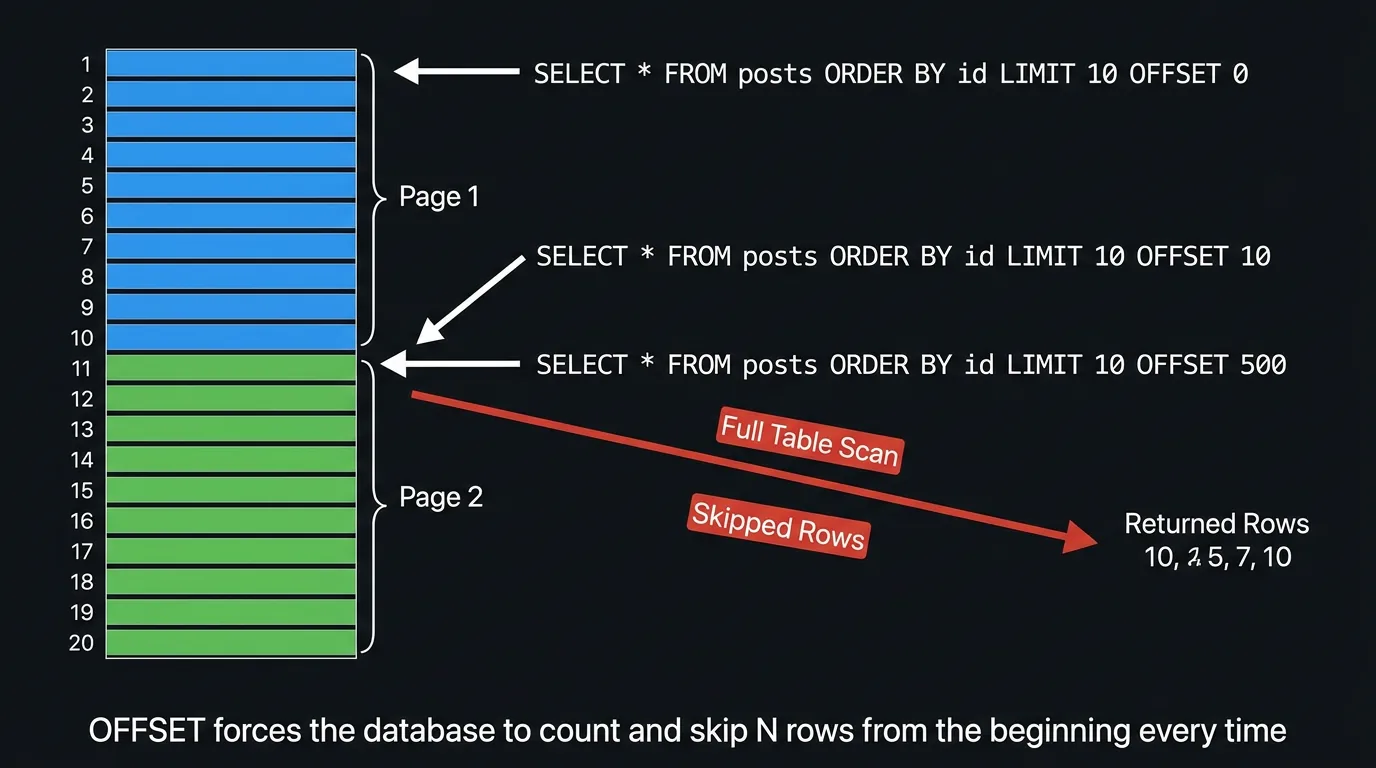
OFFSET pagination works by telling the database: "skip the first N rows and give me the next M."
-- Page 1: skip 0, take 10
SELECT id, title, created_at
FROM posts
ORDER BY created_at DESC
LIMIT 10 OFFSET 0;

-- Page 2: skip 10, take 10
SELECT id, title, created_at
FROM posts
ORDER BY created_at DESC
LIMIT 10 OFFSET 10;

-- Page 51: skip 500, take 10
SELECT id, title, created_at
FROM posts
ORDER BY created_at DESC
LIMIT 10 OFFSET 500;
Page number translates directly to OFFSET = (page - 1) * pageSize. Clean. Predictable.
What the Database Actually Does
This is where things get uncomfortable. The SQL standard and every major RDBMS implement OFFSET by materialising and discarding the skipped rows. There is no magical shortcut.
When PostgreSQL processes LIMIT 10 OFFSET 500, it:
- Evaluates the full
WHEREclause to find candidate rows - Sorts those rows by
ORDER BY created_at DESC - Reads rows 1 through 510 in order
- Discards rows 1 through 500
- Returns rows 501 through 510
Step 4 is pure waste. You are paying the full I/O and CPU cost for rows you immediately throw away.
Let's look at an actual query plan on a table with 10M rows:
EXPLAIN (ANALYZE, BUFFERS)
SELECT id, title, created_at
FROM posts
ORDER BY created_at DESC
LIMIT 10 OFFSET 500000;Limit (cost=89432.17..89432.20 rows=10 width=52)
(actual time=4821.33..4821.34 rows=10 loops=1)
Buffers: shared hit=3241 read=52891
-> Index Scan Backward using posts_created_at_idx on posts
(cost=0.56..889234.12 rows=10000000 width=52)
(actual time=0.04..4718.22 rows=500010 loops=1)
Buffers: shared hit=3241 read=52891
Planning Time: 0.18 ms
Execution Time: 4821.41 msThe planner uses the index, but it still reads 500,010 rows to return 10. The index helps with ordering, but offset forces row-by-row counting all the way down to position 500,000.
The Performance Cliff
The cost of OFFSET pagination is O(offset): linear in the number of rows to skip. The further you paginate, the slower each query gets.
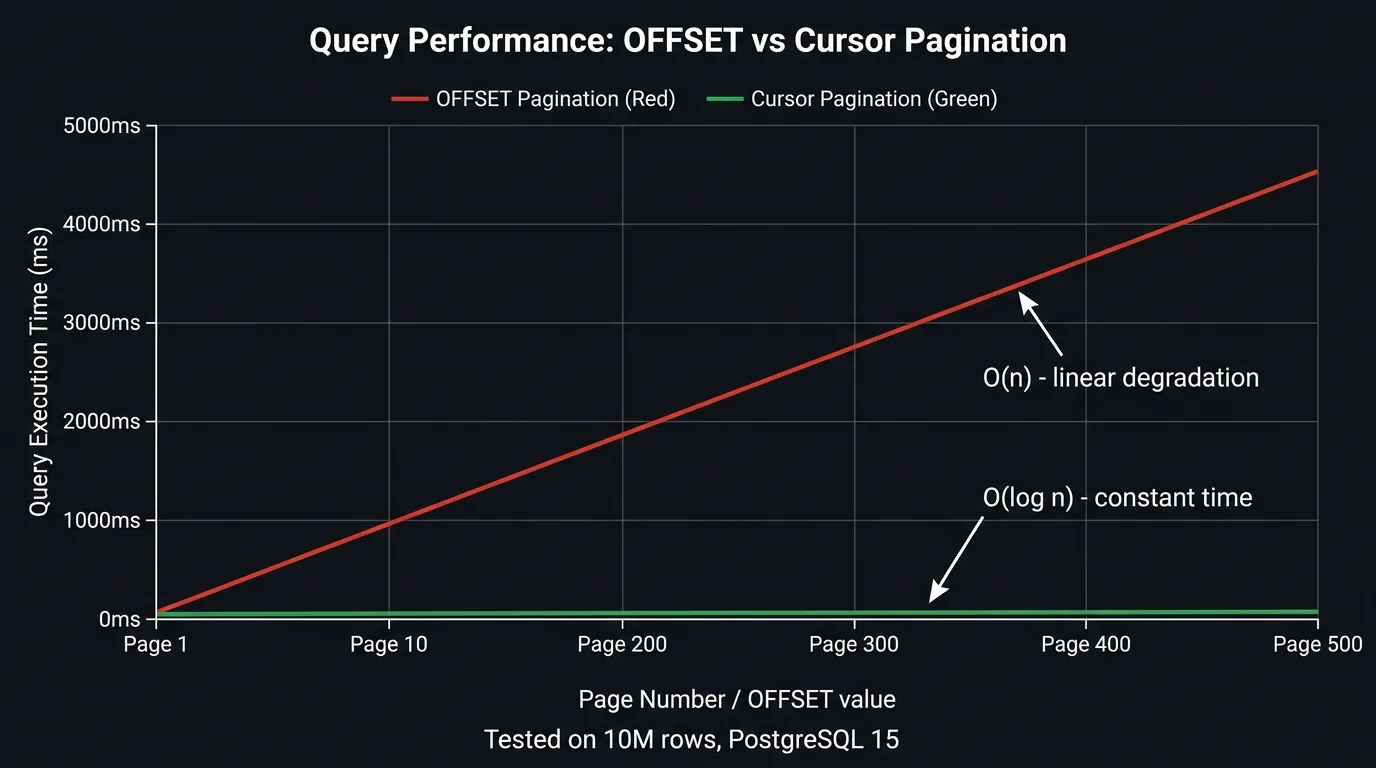
At page 1 you're reading 10 rows. At page 1,000 (with page size 10), you're reading 10,000 rows to return 10. At page 10,000, you're reading 100,000 rows to return 10. The database does proportionally more work for every deeper page, even though the client receives the same 10 rows each time.
This "performance cliff" is often invisible in development (small datasets) and during early production (few users reaching deep pages). It becomes catastrophic as data grows and users or crawlers navigate deep into result sets.
The Data Consistency Problem
OFFSET pagination has a correctness problem that no amount of indexing can fix: the dataset can shift between page requests.
If a row is inserted or deleted between two page fetches, the offset arithmetic breaks. Rows get duplicated or silently skipped.
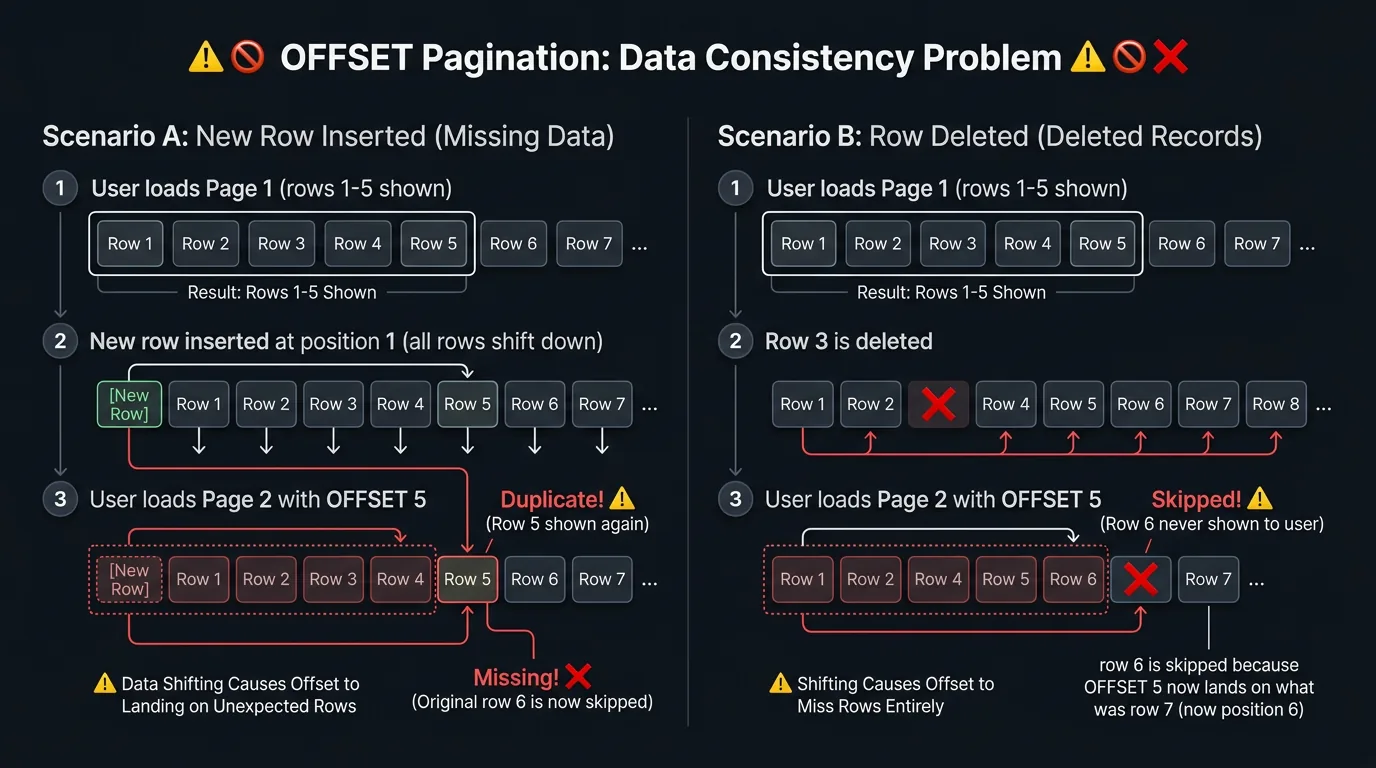
Scenario A: Insert causes duplication: User is on page 1 (OFFSET 0, rows 1-10). A new highest-priority row is inserted at position 1, shifting everything down. User fetches page 2 (OFFSET 10). The database now returns what was originally row 10 (seen on page 1) plus rows 11-19. Row 10 appears twice; row 20 is never shown.
Scenario B: Delete causes skipping: User is on page 1, sees rows 1-10. Row 3 is deleted. User fetches page 2 (OFFSET 10). The database skips 10 rows from the new dataset (which only has 9 rows where positions 1-9 used to be 1-10). Row 11 from the original set is now skipped entirely.
In a high-write environment (social feed, live auction, notification list), this is not an edge case: it happens constantly.
OFFSET pagination is not safe for concurrent write workloads. Any application where data is inserted, updated, or deleted while users paginate will produce inconsistent results. This includes most real-world applications.
When OFFSET Is Acceptable
Despite its problems, OFFSET pagination has legitimate use cases:
- Administrative UIs with small datasets: when your table has < 100K rows and writes are infrequent, the performance hit is negligible
- Reporting queries on static snapshots: if you're paginating a result set that won't change (e.g., a point-in-time export), offset is safe
- "Jump to page N" UI requirement: cursor pagination cannot support arbitrary page jumps; offset can
- Simple prototypes: getting a product working quickly where pagination performance is not yet a concern
Strategy 2: Cursor Pagination
The Core Idea
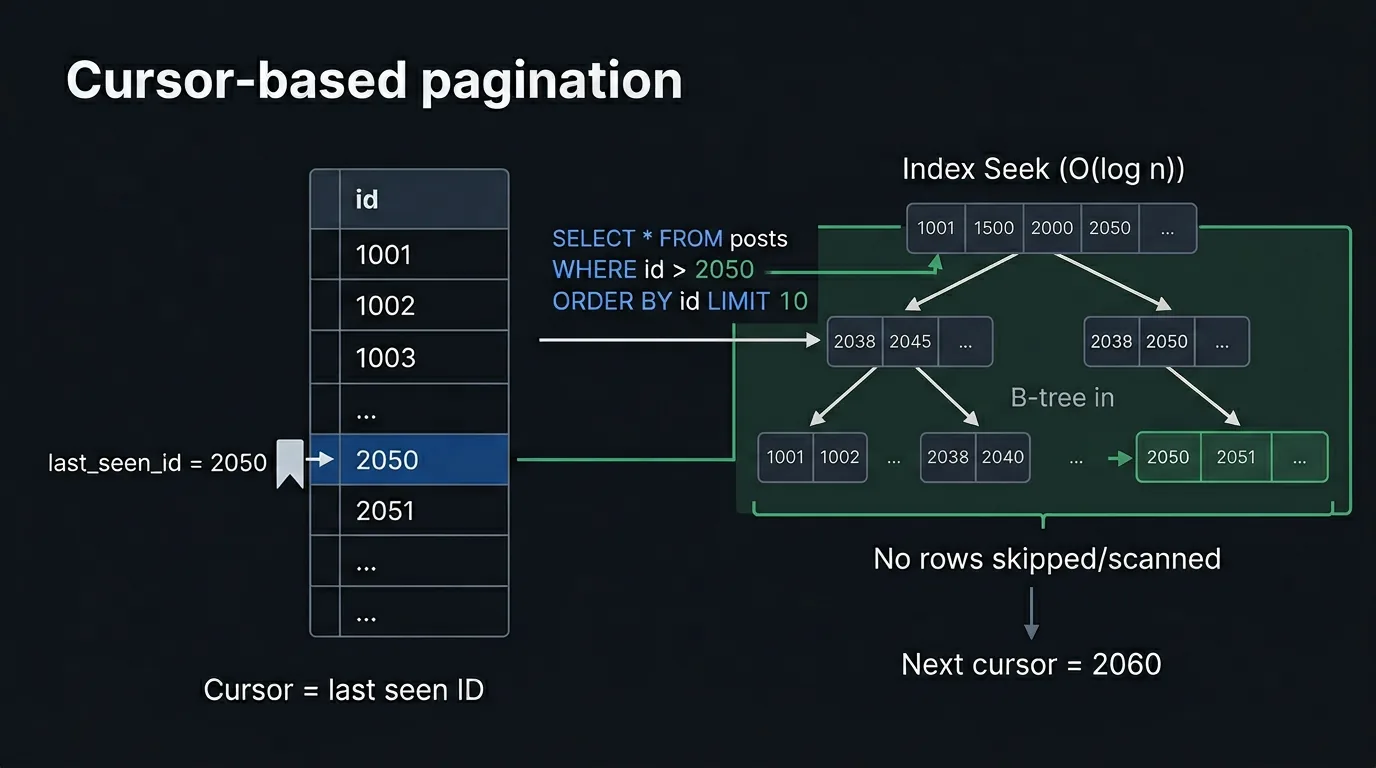
Instead of asking "skip N rows", cursor pagination asks: "give me rows after this specific position." The position is encoded in a cursor: an opaque token the client receives with each response and sends back on the next request.
-- First page (no cursor)
SELECT id, title, created_at
FROM posts
ORDER BY created_at DESC, id DESC
LIMIT 10;

-- Subsequent pages (cursor = last row from previous page)
SELECT id, title, created_at
FROM posts
WHERE (created_at, id) < ('2026-03-10 14:23:00', 5892)
ORDER BY created_at DESC, id DESC
LIMIT 10;
The WHERE clause anchors the query to a specific position in the index. The database doesn't skip anything: it seeks directly to the cursor position and reads forward.
Try the Pagination Scan Model
Change the page depth and compare the index entries each strategy visits for one request. This model assumes the cursor for that page is already available from a previous response.
Interactive example
How much work does one page take?
Move deeper into 100,000 ordered rows. Both strategies return the same page.
OFFSET
20
index entries visited
Skip 0, then read 20.
CURSOR
20+ index seek
entries read after finding the position
Start at the first index entry.
Both return positions 1–20.
Illustrative entry counts for a stable dataset with a matching index. The cursor is already known; moving this slider does not model arbitrary page jumps with a cursor. Index seek work is additional, and actual query plans and timings vary.
B-Tree Internals: Why Cursors Are Fast
To understand why cursor pagination outperforms OFFSET at scale, you need to understand how B-tree indexes work.
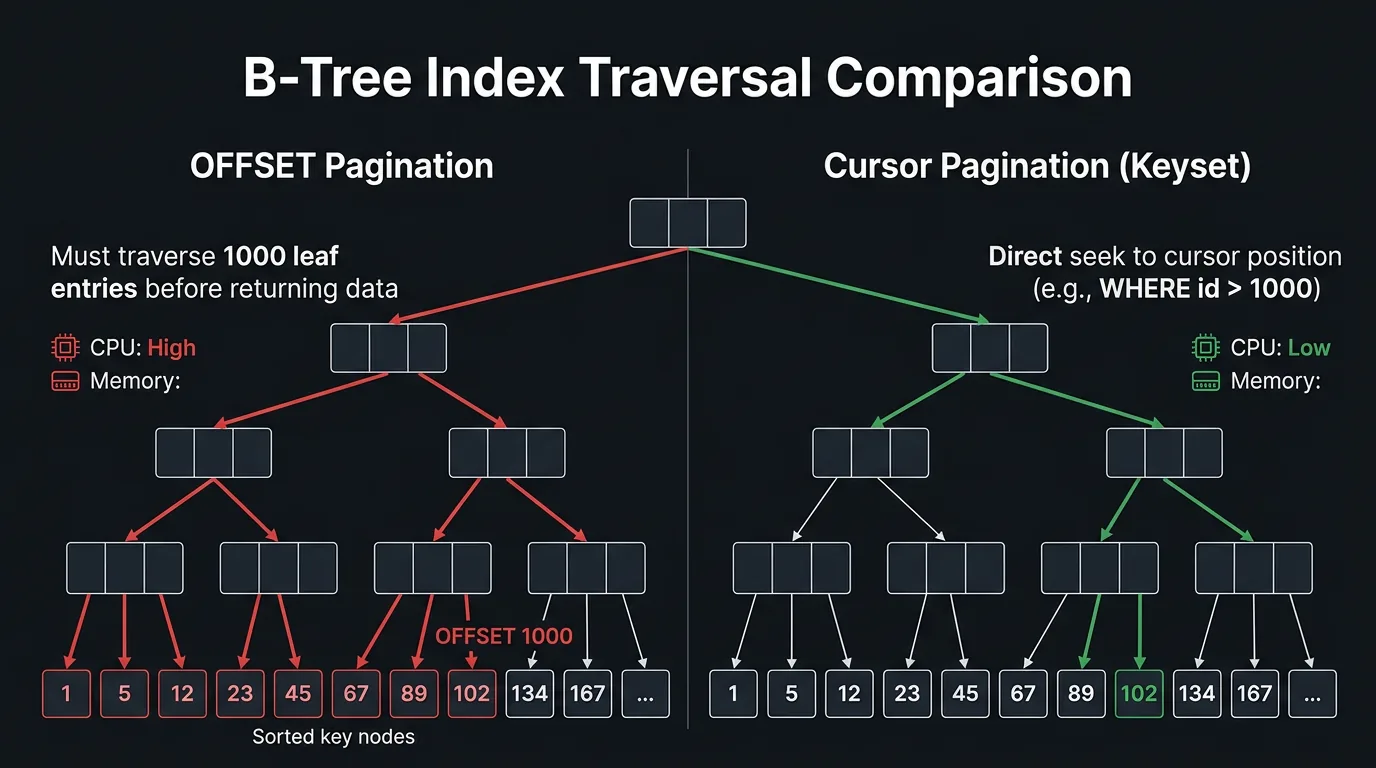
A B-tree index is a balanced tree structure. The leaf nodes are doubly-linked and contain the actual sorted key values. Every lookup starts at the root and descends through internal nodes using binary comparisons until reaching the correct leaf.
OFFSET traversal:
- Descend from root to leftmost leaf (O(log n))
- Scan forward through leaf nodes counting rows until the offset is reached (O(offset))
- Return the next LIMIT rows
Step 2 dominates. For OFFSET 500000, you're touching ~500,000 leaf entries sequentially. Each leaf page holds ~100-200 entries, so that's ~2,500-5,000 buffer reads just to reach the starting position.
Cursor traversal:
Seek to the cursor
Descend from the root to the correct leaf using the cursor value: O(log n).
Read the next page
Read the next
LIMITrows from that position: O(limit).Continue from the last row
Return the page and use its final row as the cursor for the next request.
For a table with 10M rows, log₂(10,000,000) ≈ 23. Regardless of which "page" you're on: page 1 or page 1,000,000: cursor pagination only traverses ~23 tree levels to find the starting position. The complexity is O(log n + limit), effectively constant relative to dataset size.
The Composite Cursor Problem
Simple cursors based on a single monotonically increasing integer ID work perfectly. Real world queries are messier. What if you're ordering by created_at, which is not unique?
-- WRONG: created_at is not unique: ties cause missed rows
WHERE created_at < '2026-03-10 14:23:00'
ORDER BY created_at DESC
LIMIT 10;-- CORRECT: composite cursor with tiebreaker
WHERE (created_at, id) < ('2026-03-10 14:23:00', 5892)
ORDER BY created_at DESC, id DESC
LIMIT 10;This requires a composite index on (created_at DESC, id DESC):
CREATE INDEX idx_posts_cursor ON posts (created_at DESC, id DESC);Without this index, the composite WHERE clause cannot be satisfied with an index seek and falls back to a sequential scan.
Always create a composite index that exactly matches your cursor columns and sort direction. PostgreSQL can use an index scan backward if the index is in ascending order and your query is DESC, but an explicit DESC index avoids ambiguity and is often faster in practice.
Encoding the Cursor
The cursor value should be opaque to clients: they should not parse, construct, or predict it. Expose a base64-encoded JSON token that the server decodes internally.
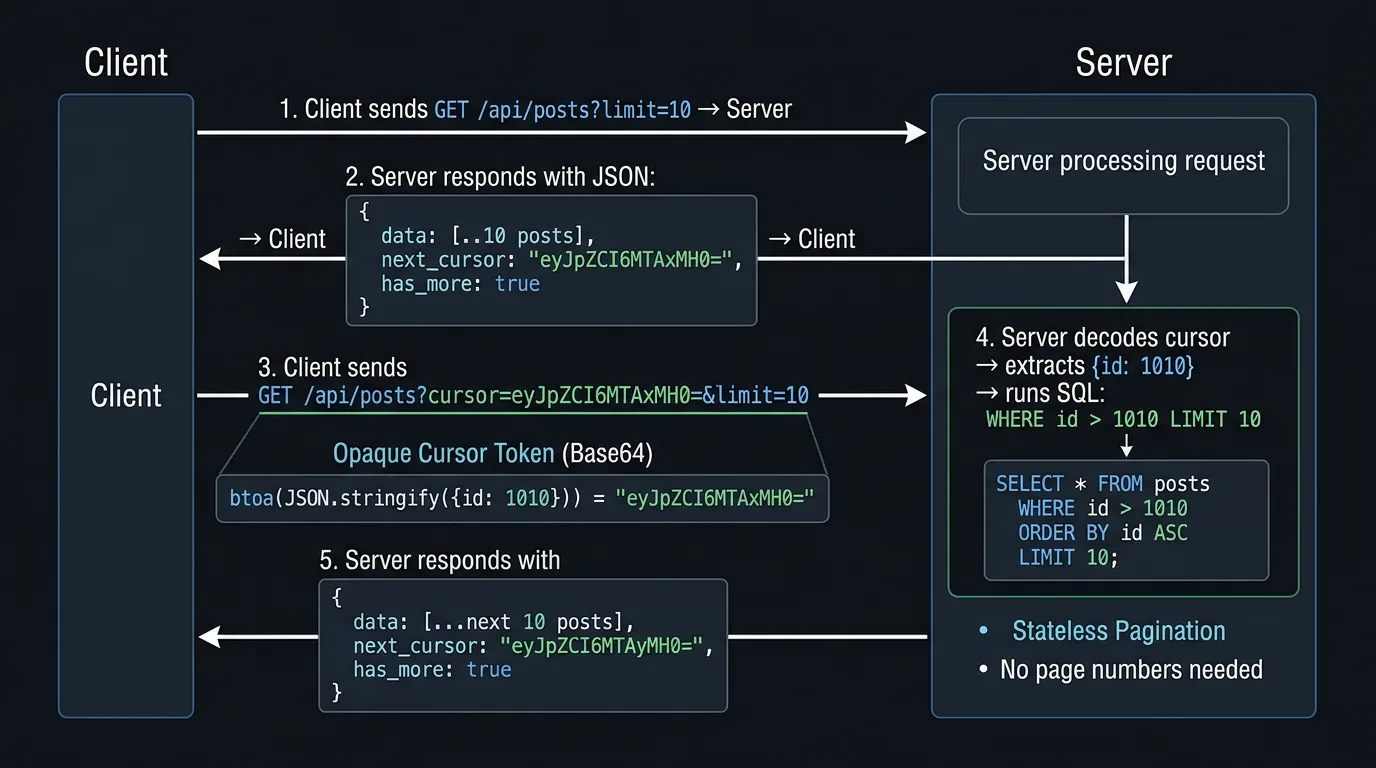
// Encoding a cursor
interface CursorPayload {
  created_at: string
  id: number
}

function encodeCursor(payload: CursorPayload): string {
  return Buffer.from(JSON.stringify(payload)).toString('base64url')
}

// Decoding a cursor
function decodeCursor(token: string): CursorPayload {
  try {
    return JSON.parse(Buffer.from(token, 'base64url').toString('utf-8'))
  } catch {
    throw new Error('Invalid pagination cursor')
  }
}
Using base64url (URL-safe base64) avoids the need to URL-encode the token when passing it as a query parameter.
Full Implementation Example
Here is a production-grade cursor pagination implementation in TypeScript with PostgreSQL:
import { Pool } from 'pg'

interface Post {
  id: number
  title: string
  created_at: Date
}

interface PaginatedResult<T> {
  data: T[]
  next_cursor: string | null
  has_more: boolean
}

interface CursorPayload {
  created_at: string
  id: number
}

function encodeCursor(payload: CursorPayload): string {
  return Buffer.from(JSON.stringify(payload)).toString('base64url')
}

function decodeCursor(token: string): CursorPayload {
  try {
    const decoded = JSON.parse(Buffer.from(token, 'base64url').toString('utf-8'))
    if (!decoded.created_at || typeof decoded.id !== 'number') {
      throw new Error('Invalid cursor shape')
    }
    return decoded
  } catch {
    throw new Error('Malformed pagination cursor')
  }
}

async function getPosts(
  pool: Pool,
  limit: number = 10,
  cursor?: string
): Promise<PaginatedResult<Post>> {
  // Request one extra row to determine if there is a next page
  const pageSize = limit + 1

  let rows: Post[]

  if (!cursor) {
    // First page: no cursor condition
    const result = await pool.query<Post>(
      `SELECT id, title, created_at
       FROM posts
       ORDER BY created_at DESC, id DESC
       LIMIT $1`,
      [pageSize]
    )
    rows = result.rows
  } else {
    const { created_at, id } = decodeCursor(cursor)

    // Subsequent pages: use composite cursor
    const result = await pool.query<Post>(
      `SELECT id, title, created_at
       FROM posts
       WHERE (created_at, id) < ($1::timestamptz, $2)
       ORDER BY created_at DESC, id DESC
       LIMIT $3`,
      [created_at, id, pageSize]
    )
    rows = result.rows
  }

  const has_more = rows.length > limit
  const data = has_more ? rows.slice(0, limit) : rows

  const last = data[data.length - 1]
  const next_cursor =
    has_more && last
      ? encodeCursor({
          created_at: last.created_at.toISOString(),
          id: last.id,
        })
      : null

  return { data, next_cursor, has_more }
}
The "fetch limit + 1" trick is the standard way to determine has_more without running a separate COUNT(*) query.
Bidirectional Cursor Pagination
Sometimes you need both "next page" and "previous page" navigation. This requires storing two cursors: one for the first item and one for the last item on the current page.
interface BidirectionalResult<T> {
  data: T[]
  page_info: {
    start_cursor: string | null
    end_cursor: string | null
    has_next_page: boolean
    has_previous_page: boolean
  }
}
To paginate backward (before cursor):
-- Get the previous page: rows just before the start cursor
-- Wrap in a subquery to re-sort after reversing
SELECT * FROM (
  SELECT id, title, created_at
  FROM posts
  WHERE (created_at, id) > ($1::timestamptz, $2)   -- reversed comparison
  ORDER BY created_at ASC, id ASC                   -- reversed sort
  LIMIT $3
) sub
ORDER BY created_at DESC, id DESC;                  -- re-sort for display
This pattern is used by the Relay cursor connection spec: the standard pagination API contract used by most GraphQL APIs.
Database Specific Behaviour
PostgreSQL
PostgreSQL's planner is excellent at recognising cursor patterns. A composite WHERE (a, b) < ($1, $2) is properly decomposed into range conditions the planner can use with a composite index:
-- PostgreSQL rewrites this:
WHERE (created_at, id) < ('2026-03-10', 5892)

-- Into the equivalent:
WHERE created_at < '2026-03-10'
   OR (created_at = '2026-03-10' AND id < 5892)
This rewrite uses the index correctly. Verify with EXPLAIN:
EXPLAIN (ANALYZE, BUFFERS)
SELECT id, title, created_at
FROM posts
WHERE (created_at, id) < ('2026-03-10 14:23:00'::timestamptz, 5892)
ORDER BY created_at DESC, id DESC
LIMIT 10;Limit (cost=0.56..1.23 rows=10 width=52)
(actual time=0.041..0.052 rows=10 loops=1)
Buffers: shared hit=5
-> Index Scan Backward using idx_posts_cursor on posts
(cost=0.56..671234.44 rows=10000000 width=52)
(actual time=0.038..0.048 rows=10 loops=1)
Index Cond: (ROW(created_at, id) < ROW('2026-03-10 14:23:00+00'::timestamptz, 5892))
Buffers: shared hit=5
Planning Time: 0.22 ms
Execution Time: 0.07 msOnly 5 buffer hits to return 10 rows from a 10M-row table. Compare that to 52,891 buffer hits for the OFFSET 500,000 query above.
MySQL / MariaDB
MySQL handles row value expressions less elegantly. The (a, b) < ($1, $2) syntax is supported but the optimizer does not always use it efficiently. The explicit expansion is safer:
-- Explicit expansion: more reliable in MySQL
SELECT id, title, created_at
FROM posts
WHERE created_at < '2026-03-10 14:23:00'
   OR (created_at = '2026-03-10 14:23:00' AND id < 5892)
ORDER BY created_at DESC, id DESC
LIMIT 10;
Ensure the composite index exists: CREATE INDEX idx_posts_cursor ON posts (created_at DESC, id DESC);
SQL Server
SQL Server supports row value expressions with (a, b) < ($1, $2) syntax and uses it correctly with covering indexes. Additionally, SQL Server's FETCH NEXT ... ROWS ONLY syntax (standard OFFSET-FETCH) has the same performance characteristics as LIMIT ... OFFSET.
Concurrency and Snapshot Isolation
One underappreciated advantage of cursor pagination: it naturally respects snapshot isolation in databases that support it (PostgreSQL, MySQL InnoDB with REPEATABLE READ, SQL Server with snapshot isolation).
When a cursor-paginated query runs, the WHERE condition (created_at, id) < (cursor_value) is deterministic and set-based. Rows that have been inserted or deleted since the first page was fetched affect only the pages where they would logically appear. Rows the user has already seen remain unchanged. Rows ahead of the cursor are fetched as they exist at query time.
In contrast, OFFSET shifts the entire logical position of every row, so any change anywhere in the table can corrupt results for any active pagination session.
Cursor pagination provides stable pagination windows in the presence of concurrent writes. New rows inserted after the cursor position appear in subsequent pages; rows before the cursor are unaffected. This is particularly valuable for real-time feeds (Twitter/X, Instagram, notification inboxes).
Compound Ordering and Edge Cases
Non-Sequential Cursors
Cursor pagination assumes a consistent, stable sort order. If you allow users to change sort direction mid-session (e.g., flip from "newest first" to "oldest first"), the cursor from the previous sort is invalid for the new sort. Each sort combination needs its own cursor scheme.
type SortField = 'created_at' | 'likes' | 'comments'
type SortDirection = 'asc' | 'desc'

interface CursorPayload {
  sort_field: SortField
  sort_direction: SortDirection
  sort_value: string | number
  id: number             // tiebreaker always included
}
Validate that the cursor's sort_field and sort_direction match the current request. Reject stale cursors with a 400 Bad Request.
NULL Values in Cursor Columns
If your cursor column can contain NULLs, comparison semantics break down. SQL's three-valued logic means NULL < 5 is NULL (neither true nor false), not true. You have two options:
- Exclude NULLs from the result set if possible (
WHERE sort_column IS NOT NULL) - Use COALESCE to give NULLs a sentinel value that sorts consistently
-- Option 2: treat NULL as the minimum value (sorts last in DESC)
WHERE (COALESCE(score, -1), id) < ($1, $2)
ORDER BY COALESCE(score, -1) DESC, id DESC
Filtered Cursors
When pagination is combined with filtering (e.g., WHERE status = 'published'), the cursor must respect the filter:
SELECT id, title, created_at
FROM posts
WHERE status = 'published'
  AND (created_at, id) < ($1::timestamptz, $2)
ORDER BY created_at DESC, id DESC
LIMIT 10;
The index should be a partial index or include the filter column:
-- Partial index for published posts only
CREATE INDEX idx_posts_published_cursor
ON posts (created_at DESC, id DESC)
WHERE status = 'published';
This dramatically reduces index size and improves seek performance when the filtered subset is a small fraction of the total table.
GraphQL Relay Cursor Connections
The most standardised cursor pagination API is the Relay Connection Specification, used as the de-facto standard for GraphQL APIs.
query GetPosts($first: Int, $after: String) {
  posts(first: $first, after: $after) {
    edges {
      cursor
      node {
        id
        title
        createdAt
      }
    }
    pageInfo {
      hasNextPage
      hasPreviousPage
      startCursor
      endCursor
    }
  }
}
The Relay spec mandates:
first/afterfor forward pagination (equivalent to ourlimit/cursor)last/beforefor backward pagination- Each
edgecontains the item (node) and itscursor pageInfoexposes cursors for the current page boundary
// Relay-compatible resolver (simplified)
async function postsConnection(
  args: { first?: number; after?: string; last?: number; before?: string }
) {
  if (args.first !== undefined) {
    return forwardPaginate(args.first, args.after)
  }
  if (args.last !== undefined) {
    return backwardPaginate(args.last, args.before)
  }
  throw new Error('Must provide first or last')
}
REST API Design for Cursor Pagination
A clean REST cursor pagination contract:
GET /api/posts?limit=10{
"data": [
{ "id": 2051, "title": "Latest post", "created_at": "2026-03-13T09:00:00Z" },
...
],
"pagination": {
"next_cursor": "eyJjcmVhdGVkX2F0IjoiMjAyNi0wMy0xMFQxNDoyMzowMFoiLCJpZCI6NTg5Mn0",
"has_more": true,
"limit": 10
}
}GET /api/posts?limit=10&cursor=eyJjcmVhdGVkX2F0IjoiMjAyNi0wMy0xMFQxNDoyMzowMFoiLCJpZCI6NTg5Mn0Design rules:
cursoris always optional on the first requestnext_cursorisnullwhen there are no more pages- Never expose raw database values in the cursor (always encode)
- Validate cursor structure on decode; return
400for invalid cursors - Consider cursor expiry for very large datasets (cursors pointing to deleted rows)
Choosing the Right Strategy
| Criterion | OFFSET | Cursor |
|---|---|---|
| Performance (early pages) | Fast | Fast |
| Performance (deep pages) | O(offset) slow | O(log n) fast |
| Correctness under writes | Inconsistent | Consistent |
| Arbitrary page jump | Yes | No |
| Total count | Easy (COUNT(*)) | Expensive / approximate |
| Sort flexibility | Any column, any order | Must match cursor columns |
| API complexity | Simple | Moderate |
| Infinite scroll / feeds | Poor | Excellent |
| Export / batch processing | Acceptable | Preferred |
| Large dataset (> 1M rows) | Problematic | Scales indefinitely |
A common hybrid: use OFFSET for page 1-5 (fast enough, simpler API) and switch to cursor-based for deeper pages. This requires either tracking a cursor checkpoint at page 5, or accepting that offset inconsistency applies only for early pages.
Decision Framework
Use OFFSET when:
- Dataset is small and stable (< 100K rows, low write rate)
- UI requires "jump to page N" or "total pages" display
- Building a quick prototype or admin tool
- The query is a one-off report on an immutable snapshot
Use Cursor when:
- Dataset is large (hundreds of thousands to billions of rows)
- Data is written concurrently while users paginate
- You're building an infinite scroll, feed, or API consumed programmatically
- You need predictable latency regardless of pagination depth
- You're exposing a public API where clients may paginate arbitrarily deep
Keyset Pagination: The Generalisation
Cursor pagination is a specific application of a broader technique called keyset pagination. The key insight is: instead of specifying a position by count from the beginning, specify it by value in the sort key.
Any query of the form:
WHERE sort_key > :last_seen_value
ORDER BY sort_key ASC
LIMIT :n
is keyset pagination. The "cursor" is just the encoded last_seen_value. This works for any sortable, indexed column: integer IDs, timestamps, UUIDs (with ordered UUID strategies like UUIDv7), composite keys, and more.
UUIDv7 as a cursor column is an increasingly popular pattern: UUIDv7 is time-ordered (like a timestamp) but globally unique (no tiebreaker needed), making it ideal as a single-column cursor in distributed systems.
-- UUIDv7 cursor: no tiebreaker needed because UUIDs are globally unique
SELECT id, title, created_at
FROM posts
WHERE id > $1::uuid
ORDER BY id ASC
LIMIT 10;
Verified Examples
Checked on September 16, 2026 with PostgreSQL 18.6. The SQL check used 103 rows with tied timestamps and 10-row pages. It compared OFFSET and composite-cursor results across all 11 pages, including the final partial page and an exhausted cursor, and confirmed that a timestamp-only cursor can skip tied rows.
The reproducible check is scripts/verify-blog/pagination.sql in the portfolio repository. It verifies query results and page boundaries; the interactive model above illustrates index entry counts under its stated assumptions.